

Description
Download Desktop My Cat – Virtual Pet, Desktop Companion, Fun, Relaxing, Play Online
Overview
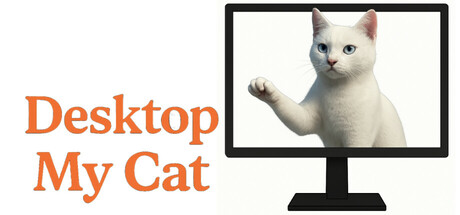
Desktop My Cat is a charming virtual pet application designed to bring a playful and comforting presence to your computer desktop. This lighthearted experience allows users to enjoy the company of a cute, animated cat that lives right on their screen, responding to simple interactions. The game offers a relaxed, low-stress environment ideal for users seeking a fun distraction during work or study sessions. It is not a traditional game with missions or objectives, but rather a digital companion that enhances the desktop experience with whimsical animations and responsive behavior.
The developer has not shared detailed story information, and no specific gameplay goals are defined. Instead, the focus lies in the cat’s reactions to user input—clicking, moving the cursor, or simply observing its movements. This minimalist approach caters to audiences who appreciate simplicity, cuteness, and ambient digital companionship. The experience is suitable for all ages and especially appealing to fans of virtual pets, desktop customization, and stress-relieving digital activities. It fits within the broader category of casual desktop entertainment, offering a gentle alternative to high-intensity gaming.
Gameplay & Core Mechanics
Gameplay in Desktop My Cat revolves around simple, intuitive interactions. Users can click on the cat to trigger various animations and responses, such as stretching, looking around, or playing with a toy. The cat moves naturally across the desktop, avoiding windows and screen edges, and reacts to cursor movements in a lifelike manner. There are no complex mechanics or structured objectives—this is not a game in the traditional sense but rather a passive companion that enhances the desktop environment.
The experience is designed for continuous, low-effort engagement. Users are not required to complete tasks or progress through levels. Instead, the enjoyment comes from observing the cat’s behavior and initiating playful moments through interaction. The developer did not provide additional gameplay details, so no specific modes, features, or progression systems are known.
- Interactive cat that responds to mouse clicks
- Animated movements and playful behaviors
- Desktop-based navigation with collision avoidance
- Minimal user input required
- Non-linear, open-ended interaction style
Graphics, Audio & Performance
Desktop My Cat features a clean, cartoonish visual style with soft colors and smooth animations. The cat’s design is simple yet expressive, with detailed facial features and fluid motion that enhance its charm. The overall aesthetic is lightweight and optimized for desktop environments, ensuring minimal impact on system performance. No official performance benchmarks were provided, and detailed graphical settings were not disclosed.
The application includes subtle sound effects that play during interactions—gentle meows, playful paws, and soft clicks—adding to the immersive experience without being intrusive. The soundtrack, if any, is not specified, but the audio is designed to complement the relaxing tone. Animations are consistent, and the cat maintains responsive behavior across different screen sizes and resolutions. Performance stability was not tested by the developer, and no platform-specific enhancements were disclosed.
Platform Compatibility & Requirements
Desktop My Cat is available for Windows operating systems. The exact version or OS compatibility was not listed, and the developer did not provide minimum system requirements. Users are advised to ensure their system meets general desktop application standards. The game is priced at $4.99, and the release version is the full, standalone desktop application. No cloud-based or subscription models were mentioned.
Pros and Cons
Pros
- Adorable, expressive cat with responsive animations
- Simple, intuitive interaction with no learning curve
- Low system requirements and lightweight design
- Perfect for stress relief and desktop decoration
- Fun, relaxing experience suitable for all ages
Cons
- No clear gameplay goals or progression
- Limited interaction variety without additional updates
- Visuals and audio are minimal, may not appeal to all users
- Platform availability restricted to Windows
- No online multiplayer or community features
FAQ Section
Is the game safe to download?
Yes, Desktop My Cat is a legitimate desktop application developed for Windows. It does not contain malware or intrusive ads, and users can download it from official sources without risk.
Is it beginner-friendly?
Absolutely. The game requires no prior experience or setup. Simply install and start interacting with the cat—no instructions or tutorials are needed.
Does it receive updates?
The developer has not disclosed a public update schedule. However, future improvements may be released based on user feedback.
What platforms support it?
Desktop My Cat is currently available for Windows. No support for macOS, Linux, or mobile platforms has been announced.
Does the game require an internet connection?
No, the application runs entirely offline. All interactions and animations are processed locally on the user’s device.
Final Thoughts
Desktop My Cat delivers a delightful, low-pressure digital companion experience that stands out in the world of casual desktop applications. While it doesn’t offer traditional gameplay or objectives, its charm lies in its simplicity, responsiveness, and ability to bring joy through small, meaningful interactions. It’s an ideal choice for users looking to add a touch of fun and comfort to their work or study space. Whether you're a fan of virtual pets or simply want a friendly face on your screen, this app offers a refreshing break from the digital noise. For a small price, it provides a lasting sense of companionship and relaxation.
Download Desktop My Cat now
Guides & Tutorials for desktop my cat
How to install desktop my cat
- Click the Preview / Download button above.
- Once redirected, accept the terms and click Install.
- Wait for the desktop my cat download to finish on your device.
How to use desktop my cat
This software is primarily used for its core features described above. Open the app after installation to explore its capabilities.
User Reviews for desktop my cat 0
No reviews found




